PHP – Arrays

Arrays store multiple items, yes that’s absolutely true. But it’s different from the arrays used in C. In PHP, arrays can hold items of different datatype unlike in C. Following array is valid in PHP –

array() is an inbuilt function in PHP used to define/initialise an array.

var_dump() is also an inbuilt function used to display complete information about any variable. For an array, the information includes- size of array, type and index number of each item, length of string incase item is string. This function, var_dump() can be used with any variable. (Try it yourself)

To access each element, we could run ‘for’ loop or ‘foreach’ loop. I will explain the working of ‘foreach’ loop in 2D-array.

2D- arrays

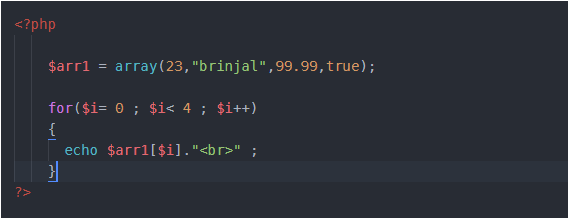
In above example, I created an array $arr1 with 4 items in it. As you can see first item in $arr1 is 23, what if instead of this 23, I create an array in its place. Got confused ! Relax and look at example below –
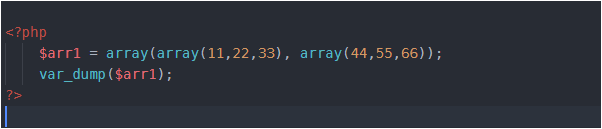
What I have done is- I have replaced 23 with an array of size 3 (11,22,33) and “brinjal” with another array of size 3 (44,55,66) i.e. arrays inside array. Thus I have created 2 arrays inside an array. Got it ! . This is 2D- array.

In above example, array with elements (11,22,33) is one row and an array with elements (44,55,66) is second row. Look below-
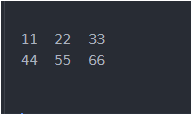
Now if you want to access 55, then you’ll write $arr[1][1] . Here, first 1 represents row number and second 1 represents column number. And you are aware that indexing starts with 0. Right !

To access 2D-array, we can use either ‘for’ loop or ‘foreach’ loop. The working of ‘for’ loop is same as in C, so here we’ll see ‘foreach loop’ –
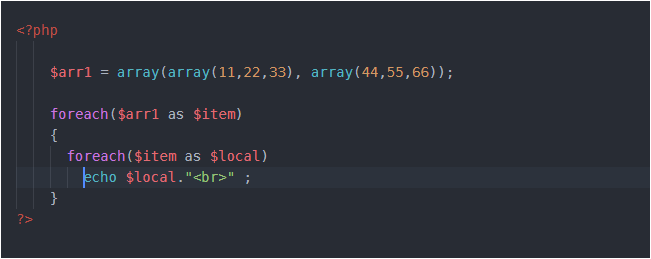
We need to pass 2 arguments in foreach loop. One is the array name and second any temporary variable which holds item present in array. So, first time when we used foreach loop there $item variable was holding first item in array $arr1 which is itself an array. This means we need to run one more foreach loop. Why ? Because we have an array as the first item inside $arr1. When we have reached second foreach loop, here $item is holding an array with 3 items in it (11,22,33) and the variable $local at first time will hold the first item in $item and it is 11, then it will hold 22, then 33 and at last we will be out of the second foreach loop. Now in the first foreach, $item will hold second item in $arr1 which is again an array. That means we need second foreach loop, and the values will get printed like this…


Associative arrays

Here, values are associated with their respective keys. Or we can say mapping is there. These look like as follows-
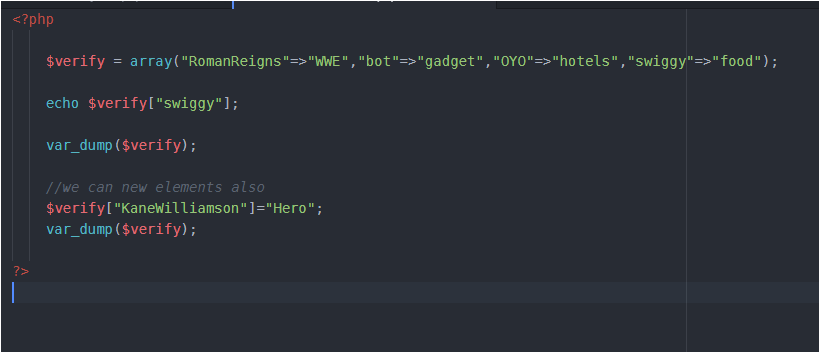
Each element/value is linked with its key. Here, ‘bot’, ‘OYO’, ‘swigggy’, ‘RomanReigns’ are keys and the values on right side of this symbol ‘ => ‘ are values. The symbol ‘=>’ is used to associate key with value. I have given random values just to make this funny, you may insert some meaningful data.

We can add some key value externally also as I have shown in above program. We can also have any datatype in keys and values, I have taken as string but it could be a number also , an integer or floating type.

There could be a question- what if, we add some value externally without specifying its key. Just as –

$verify[] = "onion"; (Try it yourself and see the result using var_dump($verify))


Some useful functions in array
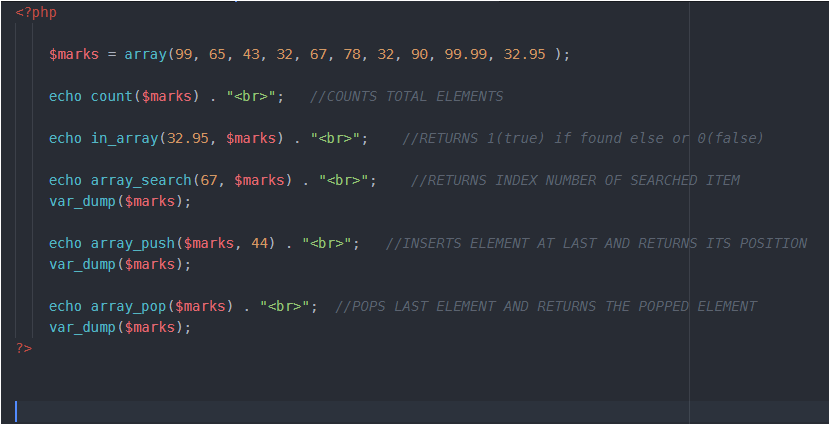
Here the important thing is to run above code and analyse the output carefully.

In above array remember, that total elements are 10 but indexing is from 0 to 9.

array_push() always inserts element at the end and outputs the position (not index number ) of last inserted item, the one it has just inserted. In above code, 44 will be inserted at index 10 but at position 11. Using var_dump, you’ll see that 44 is inserted at last.

array_pop() removes last element and returns the same .In our code the last inserted element is 44, so it will be popped out and returned.

PHP – Basic Structure

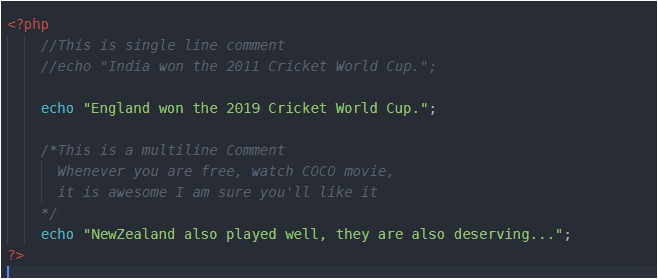
Using Comments

The way of making any statement a comment is same as in C or C++ –


Basic Syntax

PHP’s syntax is quite easy but there are 2 things you need to keep in mind while writing code in it-

  • PHP commands end with a semi-colon.
  • You must place a $ in front of all variables.

Variables

Variables are the containers which hold some value, value of any type. Variables are used with ‘$’ in PHP. There is no need to specify the datatype of variable as in C language.

Remember, string variables can hold the value either in double or single quotes.

$name = “Harry”; or $name = ‘Harry’; both are equal.

PHP- Functions

Intro to Functions

What if, to print prime numbers(upto 50) 5 times in a program, we write the same logic 5 times. Hard, right? Here comes the need of functions. So, with the use of functions we can access(call) the same logic as many times as we need in our whole program.

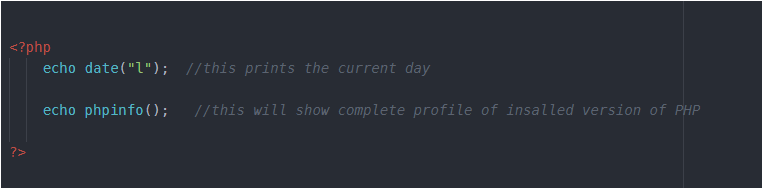
Let me first code some in-built PHP functions-

In the above code, date() and phpinfo() are the two functions. The parentheses in the function tell PHP that you are referring to a function, otherwise it would be a constant. Like this, there are hundreds of in-built functions.


Defining a Function

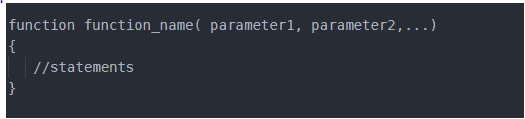
The general syntax of function is-

The first line of the syntax indicates the following:

  1. A definition starts with the word function.
  2. A name follows, which must start with a letter or underscore, followed by any number of letters, numbers, or underscores.
  3. The parentheses are required.
  4. One or more parameters, separated by commas.

Some important points to note are-

function names are case insensitive i.e.print() or PrInt() or pRint() all are same.

The opening curly brace starts the statements that will execute when you call the function.

a matching curly brace must close it. These statements may include one or more return statements, which force the function to cease execution and return to the calling code.

If a value is attached to the return statement, the calling code can retrieve it, as we’ll see next.


Returning a value

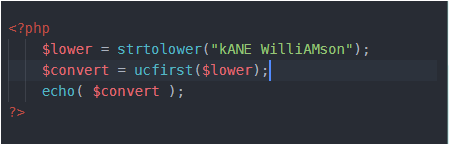
Let’s understand this with a very simple example. We’ll write a program that converts a person’s name in lowercase and then capitalize first letter of each part of the name. Don’t worry we have built-in functions for these tasks-

strtolower()- takes a string and returns the string as lowercase.

ucfirst()- it sets first character of a string to upper case and returns the converted string.

So, above code will output "Kane williamson" (First letter of name is capital, rest are in lowercase).

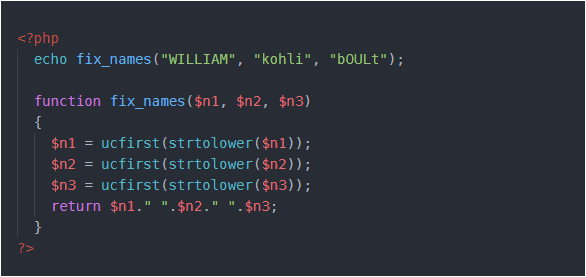
Now, let’s define a function that takes three names and makes each one lowercase, with an initial capital letter. The code for this is below-

I have combined both the functions in one expression- ucfirst(strtolower($n1)) .


Returning an array

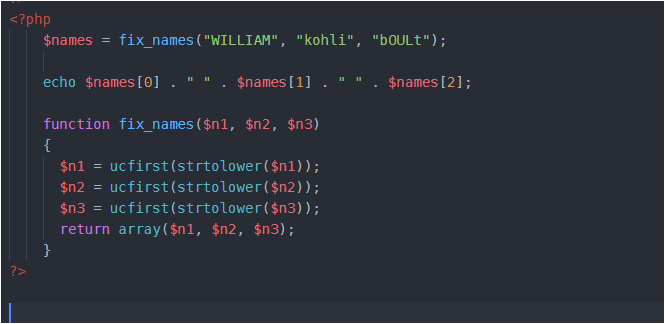
Let’s re-code above code –

Here, I have used an in-built function array() , it takes elements as parameters and returns an array. I have stored the return value from the function fix_names() in the variable $names, which is now an array name and then I have printed the elements of array using their index number, separated by space.


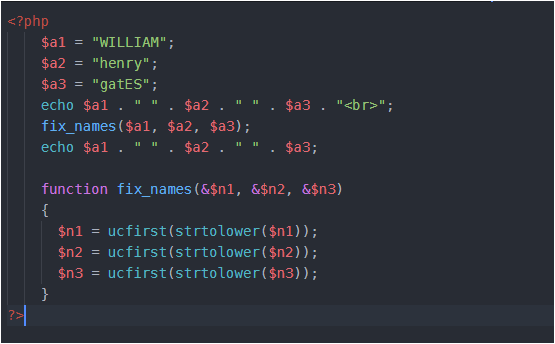
Passing arguments by reference

Look at this code carefully, CONCENTRATE…

The concept of reference is same as in C or C++. I will not go deep in it. Reference is an address of a variable, so when we change the value of a particular variable through its address, initial value is changed.


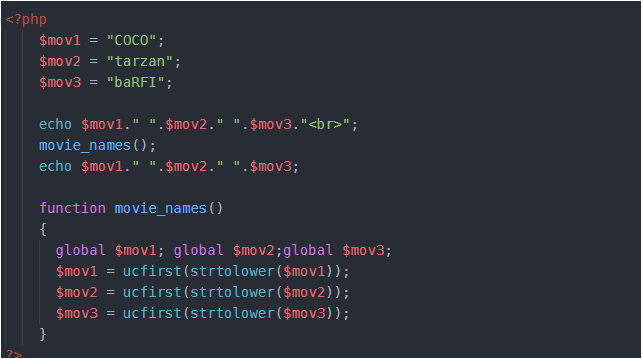
Returning Global variables

Following example explains this-

The global keyword followed by the variable name gives every part of your code full access to it. The global keyword followed by the variable name gives every part of your code full access to it.


THAT’S IT

Why this?

LearnersZone brings a compact form of common programming concepts. Each topic has explanation and readers are requested to post their queries, if any.

The topics can cover any programming language.

So without expanding our intro, LET’S GET STARTED…