Display Data from Database in Web Page

In our previous post, we successfully created a table and inserted five records in it. Now we will display the same data in a web page through a PHP file. There are some functions used to do this and this is an important part to be known. And these functions which we are going to use will be common in all php files where you intend to display something on your web page from the database.

We created this table shown below-

and now, from the above table, if we want to display the name of all books in a web page, then following piece of code will be used.

For the above code I am using PHP designer+WAMP server. Let me now explain the code.

  • mysqli_connect(hostname, username, password, database name, port, socket) ‘ function opens a new connection to the MySQL server. It has six optional parameters. I have used only first four of these. ‘myproject’ is the name of my own project you write yours and there is no password for my database so I have left it blank “”.
  • In line 7 I have stored my query in a variable $query. Please note that we pass queries in database, we cannot pass the queries elsewhere in the same manner as we do in database and since this is a PHP file, we are storing the query as a string in variable $query.
  • In line 9, the function mysqli_query() function performs the query (that we stored in $query) in the database(we have sought the connection and stored it in $link) and so we have passed $link and $query inside it. This returns an object. You can view its return type through var_dump(mysqli_query($link, $query));
  • In line 11 mysqli_fetch_row() function returns a row from the $resultset. Please note that $resultset variable holds all the records of the table but it is not in the proper format to be displayed. That’s why we use this function- to actually pick data from the table and display it in the way/format we want.
  • And the row extracted from the table through mysqli_fetch_row is stored in $r. That means $r is now an array. And so we can display whatever data we want with the use of indices.
  • I have displayed $r[0], because in the table the name of book is stored in first column of each row that is at index 0 of each row. I hope you got this explanation and if not then no issues simply write your doubt in comments.

With this you can display the name of books stored in your database in a web page. But remember this is not at all a proper way to do. We must have seen in various sites that data is presented in a proper way mostly in table form.

We’ll also display this data in a proper table format in our next post. Till then keep coding and keep consuming coffee cups :).

Have ERROR FREE coding!

Event Handling

Let’s create a simple web page where a user will give his first and last name and we’ll display his full name (by concatenating first and last name) in some other web page.

So we’ll make two files – one HTML file and one PHP file. HTML file will be for designing the layout where user will enter his first and last name and PHP file will be for generating logic to display his full name at once.

The HTML file I have designed is something like below –

<html>
  <head>
    <title>FIRST AND LAST</title>
  </head>
  <body text="darkgreen">
    <br><br><br>

    <form name="myform" action="firstand lastname.php" method="post">
    <fieldset>
      <legend>USER INFO</legend>
      <table>
        <tr>   <td>First Name</td><td><input type="text" name="first"></td>     </tr>
        <tr>   <td>Last Name</td><td><input type="text" name="last"></td>      </tr>
        <tr>   <td><input type="submit" name="submit" value="SUBMIT"></td>    </tr>
      </table>
    </fieldset>
    </form>
  </body>
</html>

Please take note of this that whenever we place any submit button in form, it is compulsory to use <form> tag. So in above code inside <form> tag I have used action=” “ . In action I have given the name of my php file which contains logic to display full name. You may give name of your PHP file inside action. So the PHP code I wrote in my PHP file is-

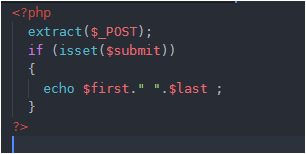
In PHP code, I have first extracted the keys into variables. (Actually the keys are the name which we give inside <input> tag in HTML file. You may check this using var_dump($_POST)) .

So converting keys into variables allows us to handle them as normal variables in PHP. Using isset($submit) tells us whether SUBMIT button is pressed or not. (submit is the name of my SUBMIT button in my HTML code, if you have given some other name use that name) . If SUBMIT is pressed then the first and last name will be concatenated with a space in between. And we will simply echo this. ($first and $last are my name which I have given to first and last name respectively in my html code, yours might be different so use that)

Save both your PHP and HTML file in Documents Tool Folder (www) and run your HTML file (not PHP).

That’s it.

Have ERROR FREE coding!

How to read values from HTML file in PHP file

Remember we created a form in HTML, we entered our details and those details were clearly visible in URL. But if we use method="post"inside <form> tag in our HTML file, our details will not be visible. And recall how we used action attribute to send/post the details to some other page, and this page could be any HTML or PHP file. Also remember that whenever you want the user to submit his/her details by pressing a submit button, it is necessary to use form tag.

So here we’ll read those details in PHP file. When we coded that form in HTML file, we used <input> tag and inside it we used attributes/property like type and name. Type was used to specify the type of value the applicant should enter – text, email, password, file, image, color, date, etc. And the name given to name property is used as a key to access the details entered by the applicant in respective fields. So with the help of this KEY only we are going to read the values. This is known as EVENT HANDLING.

So first we’ll make a new PHP file. In that file we have, actually, two ways to read values.

First way

Open PHP file, and type following code and save the file-

<?php
    var_dump($_POST);
    
?>

$_POST and $_GET are known as Super Global Variables.

But, but, but…first, open your form which we designed in HTML and make some changes there in coding. Look there you must have opened <form> tag and inside that you must have written name= ” ” , method=” ” and action=” “. Right.

  • In name you can give any value that doesn’t matters, in method you should write either method=”post” or “get” .I am considering that you are aware of meaning of both of these. In action, we write the name of that file where we want to post the information submitted by applicant.
  • So, the above PHP code which I have written, you type it save it with extension .php.
  • The name which you are giving to this PHP file is important. Why important? Because we want the data to be displayed in this PHP file only, so quickly go back to your HTML code (code where we designed the complete form), inside the <form> tag, in action= ” “ , between the double quotes type the name of your PHP file, which you just saved. Done!
  • And before running your this HTML file, note that if you have written method=”post” inside <form> tag, then above PHP code which I have written is valid but if you have written method=”get”, then you need to make just a small change in above PHP code, write var_dump($_GET). That’s it !
  • You can now safely run your HTML file (not PHP file because you created PHP file just to get the information filled by user in the form and that form is designed in HTML file).
  • Fill the details and click on submit button.
  • You will get an output displaying all the information. You need to look carefully and understand the format of output, it will help in displaying individual values in PHP. Got it!

Now you must have got that the output we are getting is in the form of Associative Arrays. Why Associative Arrays? Because, look carefully, the names which we assigned in our HTML file inside the <input> tag are now acting like keys…Yes ! Now it will be quite easy to access the values associated with those keys.

So again quickly jump to your PHP code and add some lines-

<?php
    var_dump($_POST);

    echo $_POST['mob']."<br>";
    echo $_POST['fname']."<br>";
    echo $_POST['mname']."<br>";
    
?>

I have printed just three values, you may print all your values through the value of name which you gave in your HTML file. But printing individual values in this way is tiring.

So, let’s understand the second way to print values.


Second WAY

This is easy. Believe me. As we saw that the output we get after submitting our form is stored in associative array (key-value pair). We have an excellent in-built function extract(). It does all the job for us. Look at following code first –

<?php
    extract($_POST);

    echo $mob."<br>";
    echo $fname."<br>";
    echo $mname;

?>

We know, that $_POST or $_GET is an associative array name which has key-value pairs. So what extract() function does is- it converts keys into variables. And when keys are converted into variables we can simply print them through echo. This is simpler than previous method.


While displaying values you may face problem in printing the values of radio buttons and checkboxes. So let’s solve that. Open your ‘form’ code which, of course, you must have saved in some HTML file. There in gender you must have used two input tags (one for male other for female) with type=”radio”. Inside both input tags use two more properties- name property and value property. Carefully, give same name in name property in both input tags. While in value property, write value=”Male” in male input tag and value=”female” in female input tag. Now, run the output fill the form click on submit and you will surely get the right gender. And if you are not getting, then please share your problem here in comments so that I may help.

In case of checkboxes, the name which we give in the name property inside <input> tag should be an array and you should write some value in value property also. Let me explain with one example below-

<input type= "checkbox" name="chk[]" value="Reading blogs">Reading Blogs
<input type= "checkbox" name="chk[]" value="Net Surfing">Net surfing
<input type= "checkbox" name="chk[]" value="Programming">Programming
<input type= "checkbox" name="chk[]" value="Travelling">Travelling

I expect you must have got some idea how to do it. I haven’t taken any row or column, I have just given an idea of “hobbies” how you should write inside input tag. You must write this inside some row. I randomly picked some line.


I am telling to run HTML file and not PHP file and I have, above, given a valid reason also why to do so. But what if you run your PHP file without running your HTML file, of course errors will come. But if you make sure that PHP file should run only if user presses SUBMIT button in his/her form, then no error will be displayed. We’ll just do a little coding in our PHP file for this.

We have learnt that we first convert all the keys into variables through extract(). Right. To check if an applicant has pressed the SUBMIT button, we use isset($var_name).

So when an applicant presses SUBMIT in the form, the name in name property inside <input> tag is SET or ON. Coming back to our PHP code, after extracting values if the user would have pressed SUBMIT, then the name which i have taken “subBtn” would be ON or SET. Now, if I pass the name of name inside if (isset($subBtn)) then the condition will be true. Why True? Because $subBtn has now become a variable after being extracted through extract(). And when I am saying that an applicant has pressed SUBMIT button that means subBtn is ON or SET or TRUE. And so the block inside if(isset($subBtn)) will surely run. You can print all your values inside if block. And if an applicant would not have pressed SUBMIT then subBtn will be UNSET or OFF or FALSE, so the block inside if you will not run and so you will not get any error.

I have tried to explain this in most plain words, but if there is some problem please ask…That’s your HUMAN RIGHT 🙂


Doing just this much is not at all enough. We’ll do 2 more things for practice in event handling-

1- We’ll go to our calculator, and print the result there itself in result box. Click here.

2- we’ll create a login page and check if user is valid or not. Click here.

THAT’S ALL ! Please follow this blog so that you may get updates of the latest posts.

Have ERROR FREE coding.

Some Important String Functions in PHP

I have just finished watching Amitabh Bachchan’s 3 hr film- ‘Muqaddar ka Sikander’. It has some beautiful songs. But you know, the whole film was like full of dialogues, statements and even songs too were statements i.e everything is in STRING. Thus, STRINGs are of great use everywhere. The data submitted by user is mostly in strings and we’ll have to operate upon those strings. So for this, we have some predefined functions and PHP offers them free of cost. 🙂

Before moving to functions let’s work on some basic tips.

  • To print a statement in PHP, we use echo. Right. We know this. But there is a difference in printing any statement using double quotes and printing a statement using single quotes. Let me show you-
<?php
$ques1 = "Who will be the next IMF Chief?";
$ques2 = "Who will now head Bank of England?" ;

echo 'My first question is:: $ques2'. "<br>";
echo "My second question is:: $ques1" ;

?>

In line 5th I have used single quotes so in its output the value of $ques2 will not be replaced. Whereas in line 6th, $ques1 will be replaced by its value. So the output will be-

My first question is:: $quest2
My second question is:: Who will be the next IMF Chief?

Got it ! So its better to use double quotes.


You must have learnt of escape sequences earlier. Let me just brief it. Escape sequences begin with ‘\’ and are used to give some special meaning to a character (not all characters) like- ‘\n'(to transfer control to new line) or ‘\t'(tab space) or ‘\f'(formfeed) or ‘\a'(a beep sound), you must have studied all this.

Apart from this, escape sequences are also used to remove the speciality of special characters. When we print some statement using echo, we use double quotes most of the time. Suppose we want to print double quotes, then? Look at following code-

<?php
$ques1 = "Who will be the next IMF Chief?";


echo "My first question is:: \"$ques1\" " ;


?>

In above code, double quotes are special character because they represent string. That’s why inside echo

  • I have first used double quotes- to tell PHP that we are printing some string
  • then I have written my string “My first string is::”
  • then look carefully, I have used – \” . This is done to tell PHP that it should neglect the meaning of double quotes, which is to begin or end the string. So when its actual meaning is neglected, double quotes gets printed just as any normal character.
  • So in order to print double or single quotes, simply use \ . Try the code by yourself, make some changes and analyze the result by yourself.
  • We can even print this \ by writing – echo "Today Indians should be \\proud\\ of their scientists at \" ISRO \" " . Please run this and you’ll understand the things in a better way.

Now, coming to String Functions

  • strlen( $str ) – tells the length of any string
  • strcmp( $str1, $str2) – returns 0 if both strings are equal, returns -1 if str2 is greater than str1, returns 1 if str2 is smaller than str1 . The point to remember her is it is case sensitive.
  • strcasecmp($str1, $str2) – it is case- insensitive, and returns the same output as strcmp().
  • strstr($haystack, $needle) – here $haystack and $needle are not any ‘bhoot’ :). These are simple parameters. First look at this code-
<?php

$ques1 = "my name is khan, and yours?";
$ques2 = "is";

echo strstr($ques1,$ques2);

?>

Please, run this code first and then read my explanation. $haystack is a string in which PHP finds $needle (it is also a string) and the from the position where it finds $needle, it prints the complete $haystack till last. I have replaced $haystack with $ques1 and $needle with $ques2 $haystack and $needle are terms given by PHP. You may completely ignore these complex-looking terms.

  • strpos( $haystack, $needle, [offset]) – it tells the index number of $needle in $haystack. Remember that index number starts with 0. Here offset is an optional parameter, it gives the position from where the $needle is searched in $haystack.
  • str_replace($search, $replace, $subject, [$count]) – the term $search which will be replaced by $replace in the sentence $subject. Here too, $count is optional and it returns the total number of items replaced.
  • ucfirst($str) – it is used to capitalize first character of $str.
  • ucwords($str) – used to capitalize first character of each word in $str.
  • strtoupper($str) – used to convert $str to uppercase.
  • strtolower($str) – used to convert $str to lowercase
  • str_shuffle( $str) – shuffles the string $str
  • explode($delimiter, $str, [int $limit]) – this performs fantastic job. First look at code and then move on explanation.
<?php

$str = "India should improve its primary education first to aim for New India";

var_dump(explode('i', $str)); 


?>

In above code, ‘i’ is $delimiter which never gets printed and breaks the string from the place where this ‘i’ is present. When the string is broken its various elements gets stored as an array. So when you will run above code, you will get an array. The third parameter $limit is optional, it states the number of elements in a broken. If you will pass $limit as 2, then there will be only two elements in array. Test it Yourself, it will be more beneficial…

  • implode($glue, $array) – this functions joins all elements of $array with $glue in between. Not got it . Superb ! Look at code below-
<?php

$str = "India should improve its primary education first to aim for New India";

$arr = (explode('i', $str));

echo implode(" ", $arr);
?>

In above code the elements are first separated using explode (it is same as we did in previous code) and then i have stored those elements in $arr and then joined them using implode(). Inside implode(), I have passed space ” ” as $glue and $arr as $array to join the elements with space between them. You run the code and you will understand.

  • str_split($original_str, [$splitting_length]) – this splits the $original_string into $splitting_length size elements. If you have given $splitting_length as 3, then each element of $original_string will be split into elements each of size 3.Try it yourself, its not at all complex.
  • md5($str) – it is a globally used function for security of data. It stands for- Message Digest Algorithm 5. It is used to encrypt $str. The output will always be a 128-bit value irrespective of $str.

That’s it for PHP functions. And this is not the complete list of functions there are many more. These, that I have mentioned, are the most used ones.

Have ERROR FREE coding ! You can now go out and play… 🙂

Default value arguments in PHP

Functions can be inbuilt or user-defined, inbuilt functions are ready made ones, these include array(), var_dump(), array_search(), there are many…

When we create functions, they are termed as user- defined functions. In user defined functions we pass some values in it those values are passed as formal parameters inside the function. Let me show you an example-

One thing to note in above code is- we can call our function anywhere in program irrespective of its position of function definition. In program, I have called calci() 2 times and it is valid in PHP.

The variables $a,$b,$c,$d are formal parameters and their scope is limited within function only. They do not exist outside function. While the values passed during calling of function 4,6,8,82 are actual parameters.

Imagine if $a, $b, $c, $d are prices of four items and what if price of $d remains same every time. We can do it in following way-

In above code, I have set $d as default value argument i.e. by default its value will be 82. In case you want to pass your own value, you can do so. In that case 82 will be over-written by your value.

What happens is – the values 4,6,8,82 goes to $a, $b, $c, $d respectively. When we make $d as default argument, the values 4,6,8 goes to remaining three variables.

Suppose we want to make $a and $d both as default value arguments, then ? We all will quickly do this-

function calci($a=4, $b, $c, $d=82)

and in function calling – calci(6,8);

But no, this is absolutely wrong . Because how will PHP know that it has to copy the value 6 to $b. PHP will copy 6 to $a and 8 to $b and then no value for $c, and no value for $d also. But remember that $d is in last and it has its default value, so no matter if $d gets value or not, it has it’s own value. But the problem is for $c. So what to do now? Relax and look at the following code-

What I have done is- I have written all default arguments ($a ,$d) at last. Now, the value 6 is copied to $b, the value 8 is copied to $c and no value is copied to $a and $d. But this is not an error here, because both of these have their default arguments with them.

So the conclusion is always keep default value arguments at the end of the list.

I hope this is clear, if not, then no problem comment your doubt here and it will be resolved and you will feel SUPER GOOD.

Have a ERROR-FREE coding…

PHP – Arrays

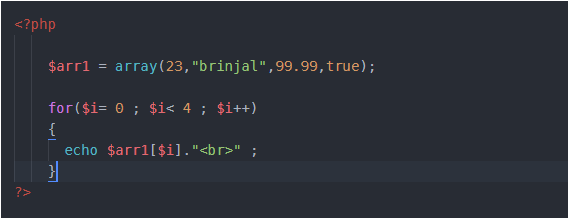
Arrays store multiple items, yes that’s absolutely true. But it’s different from the arrays used in C. In PHP, arrays can hold items of different datatype unlike in C. Following array is valid in PHP –

array() is an inbuilt function in PHP used to define/initialise an array.

var_dump() is also an inbuilt function used to display complete information about any variable. For an array, the information includes- size of array, type and index number of each item, length of string incase item is string. This function, var_dump() can be used with any variable. (Try it yourself)

To access each element, we could run ‘for’ loop or ‘foreach’ loop. I will explain the working of ‘foreach’ loop in 2D-array.


2D- arrays

In above example, I created an array $arr1 with 4 items in it. As you can see first item in $arr1 is 23, what if instead of this 23, I create an array in its place. Got confused ! Relax and look at example below –

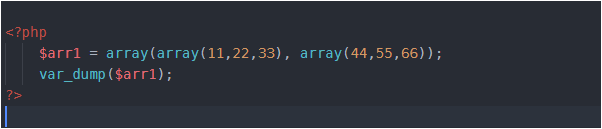
What I have done is- I have replaced 23 with an array of size 3 (11,22,33) and “brinjal” with another array of size 3 (44,55,66) i.e. arrays inside array. Thus I have created 2 arrays inside an array. Got it ! . This is 2D- array.

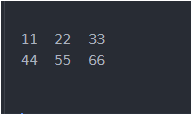
In above example, array with elements (11,22,33) is one row and an array with elements (44,55,66) is second row. Look below-

Now if you want to access 55, then you’ll write $arr[1][1] . Here, first 1 represents row number and second 1 represents column number. And you are aware that indexing starts with 0. Right !

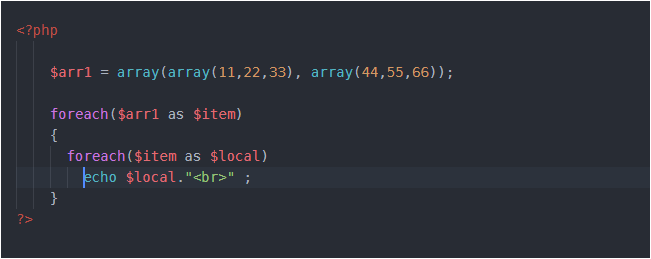
To access 2D-array, we can use either ‘for’ loop or ‘foreach’ loop. The working of ‘for’ loop is same as in C, so here we’ll see ‘foreach loop’ –

We need to pass 2 arguments in foreach loop. One is the array name and second any temporary variable which holds item present in array. So, first time when we used foreach loop there $item variable was holding first item in array $arr1 which is itself an array. This means we need to run one more foreach loop. Why ? Because we have an array as the first item inside $arr1. When we have reached second foreach loop, here $item is holding an array with 3 items in it (11,22,33) and the variable $local at first time will hold the first item in $item and it is 11, then it will hold 22, then 33 and at last we will be out of the second foreach loop. Now in the first foreach, $item will hold second item in $arr1 which is again an array. That means we need second foreach loop, and the values will get printed like this…


Associative arrays

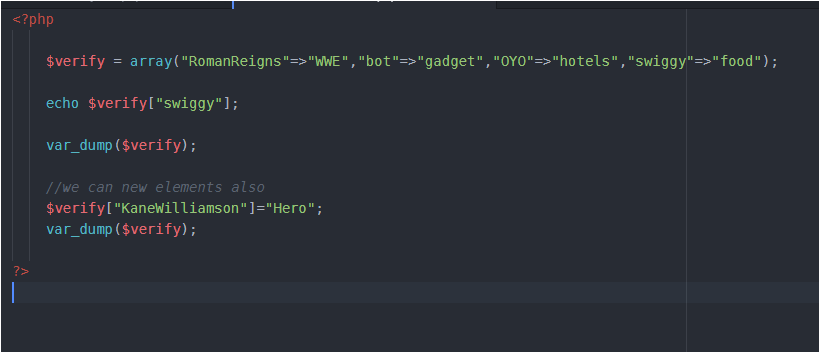
Here, values are associated with their respective keys. Or we can say mapping is there. These look like as follows-

Each element/value is linked with its key. Here, ‘bot’, ‘OYO’, ‘swigggy’, ‘RomanReigns’ are keys and the values on right side of this symbol ‘ => ‘ are values. The symbol ‘=>’ is used to associate key with value. I have given random values just to make this funny, you may insert some meaningful data.

We can add some key value externally also as I have shown in above program. We can also have any datatype in keys and values, I have taken as string but it could be a number also , an integer or floating type.

There could be a question- what if, we add some value externally without specifying its key. Just as –

$verify[] = "onion"; (Try it yourself and see the result using var_dump($verify))


Some useful functions in array

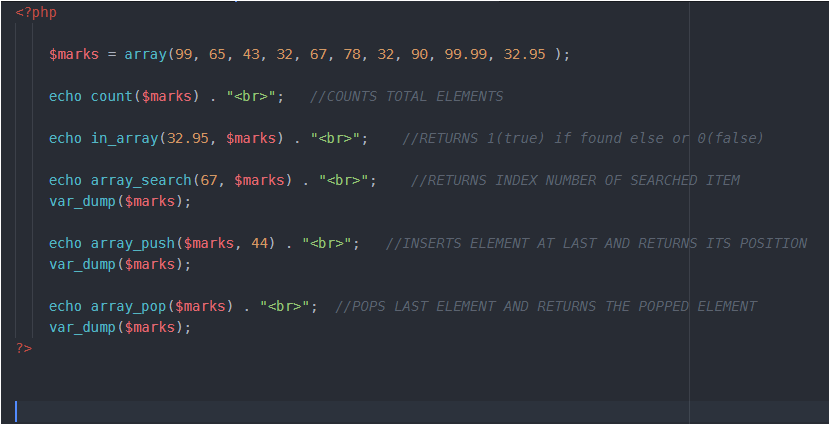
Here the important thing is to run above code and analyse the output carefully.

In above array remember, that total elements are 10 but indexing is from 0 to 9.

array_push() always inserts element at the end and outputs the position (not index number ) of last inserted item, the one it has just inserted. In above code, 44 will be inserted at index 10 but at position 11. Using var_dump, you’ll see that 44 is inserted at last.

array_pop() removes last element and returns the same .In our code the last inserted element is 44, so it will be popped out and returned.


PHP – Basic Structure

Using Comments

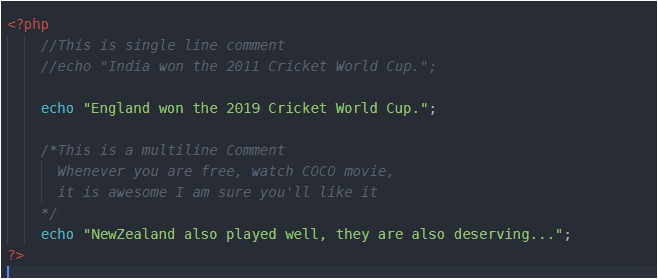
The way of making any statement a comment is same as in C or C++ –


Basic Syntax

PHP’s syntax is quite easy but there are 2 things you need to keep in mind while writing code in it-

  • PHP commands end with a semi-colon.
  • You must place a $ in front of all variables.

Variables

Variables are the containers which hold some value, value of any type. Variables are used with ‘$’ in PHP. There is no need to specify the datatype of variable as in C language.

Remember, string variables can hold the value either in double or single quotes.

$name = “Harry”; or $name = ‘Harry’; both are equal.

PHP- Functions

Intro to Functions

What if, to print prime numbers(upto 50) 5 times in a program, we write the same logic 5 times. Hard, right? Here comes the need of functions. So, with the use of functions we can access(call) the same logic as many times as we need in our whole program.

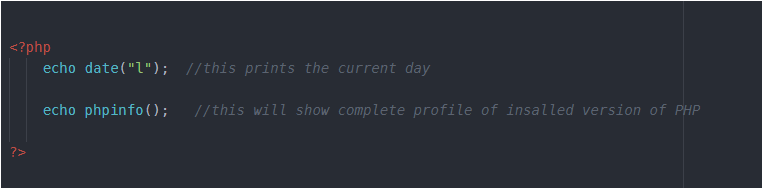
Let me first code some in-built PHP functions-

In the above code, date() and phpinfo() are the two functions. The parentheses in the function tell PHP that you are referring to a function, otherwise it would be a constant. Like this, there are hundreds of in-built functions.


Defining a Function

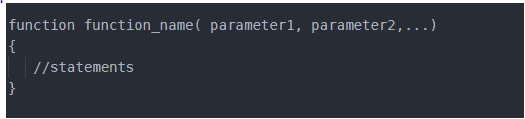
The general syntax of function is-

The first line of the syntax indicates the following:

  1. A definition starts with the word function.
  2. A name follows, which must start with a letter or underscore, followed by any number of letters, numbers, or underscores.
  3. The parentheses are required.
  4. One or more parameters, separated by commas.

Some important points to note are-

function names are case insensitive i.e.print() or PrInt() or pRint() all are same.

The opening curly brace starts the statements that will execute when you call the function.

a matching curly brace must close it. These statements may include one or more return statements, which force the function to cease execution and return to the calling code.

If a value is attached to the return statement, the calling code can retrieve it, as we’ll see next.


Returning a value

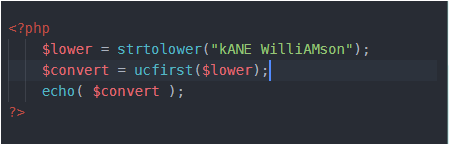
Let’s understand this with a very simple example. We’ll write a program that converts a person’s name in lowercase and then capitalize first letter of each part of the name. Don’t worry we have built-in functions for these tasks-

strtolower()- takes a string and returns the string as lowercase.

ucfirst()- it sets first character of a string to upper case and returns the converted string.

So, above code will output "Kane williamson" (First letter of name is capital, rest are in lowercase).

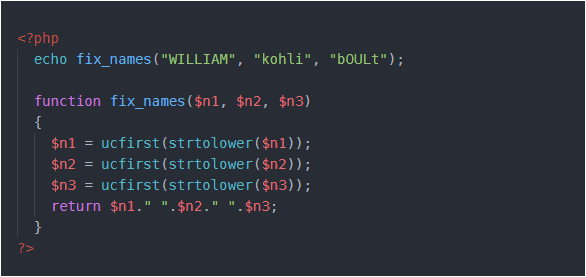
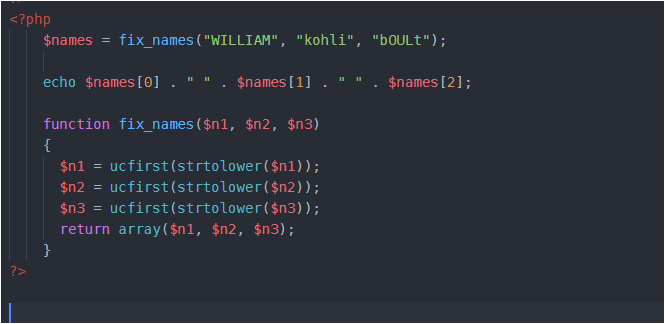
Now, let’s define a function that takes three names and makes each one lowercase, with an initial capital letter. The code for this is below-

I have combined both the functions in one expression- ucfirst(strtolower($n1)) .


Returning an array

Let’s re-code above code –

Here, I have used an in-built function array() , it takes elements as parameters and returns an array. I have stored the return value from the function fix_names() in the variable $names, which is now an array name and then I have printed the elements of array using their index number, separated by space.


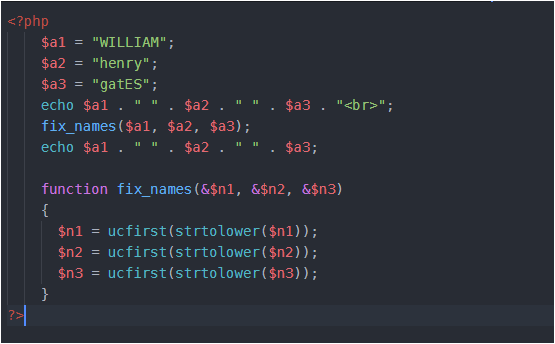
Passing arguments by reference

Look at this code carefully, CONCENTRATE…

The concept of reference is same as in C or C++. I will not go deep in it. Reference is an address of a variable, so when we change the value of a particular variable through its address, initial value is changed.


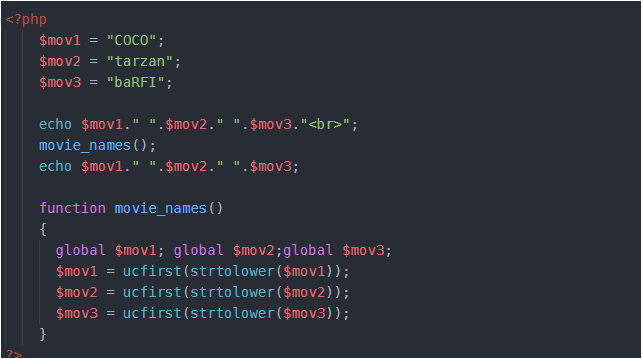
Returning Global variables

Following example explains this-

The global keyword followed by the variable name gives every part of your code full access to it. The global keyword followed by the variable name gives every part of your code full access to it.


THAT’S IT