Event Handling 2

Previously, we coded in PHP to check if the user is verified or not and we did this by matching his user name and password with our pre-declared user name and password.

Now we will expand this verification to three users. Yes, if any of those three users logins with their respective name and password, they will be successfully logged in. So, our HTML login page will be same that we created earlier –


<html>

<head>
	<title>Untitled 1</title>
</head>
<body text="maroon">
  <form action="firstand lastname.php" method="post" name="myform">

    <table border="5" bordercolor="darkslategray" align="center" width="400px" >
      <tr><td>UserID</td><td><input type="text" name="uid"></td>
      <tr><td>PASSWORD</td><td><input type="password" name="pwd"></td>
      <tr><td align="center" colspan="2"><input type="submit"
       value="LOGIN" name="submit"></td></tr>
   </table>
 </form>

</body>
</html>

Now we have to think a logic to display the message. I have derived the following logic yours might be different.

<?php
 $user = array("Randy Orton", "Lesnar", "Roman Reigns");
 $passwd = array("randy", "lesnar", "reigns");

 $count= 0 ;
 $nm = " ";
 extract($_POST);
 if (isset($submit))
 {
   for($i=0 ; $i<3 ; $i++)
   {
     if (strcmp($user[$i],$uid)==0 && strcmp($passwd[$i],$pwd)==0)
     {
       $count=1;
       $nm = $uid ;
       break;
     }
   }
  if($count==1)
    echo "Welcome $nm, You are successfully logged in.";
  else
    echo "Invalid Username or Password";
 }
?>

Remember that it is not compulsory to make two different files. We can embed both the codes in one single PHP file store it in www and run it. But it is better to keep your designing part and logic part separate in HTML and PHP files respectively.

That’s it.

Have ERROR FREE coding!

Event Handling

Let’s create a simple web page where a user will give his first and last name and we’ll display his full name (by concatenating first and last name) in some other web page.

So we’ll make two files – one HTML file and one PHP file. HTML file will be for designing the layout where user will enter his first and last name and PHP file will be for generating logic to display his full name at once.

The HTML file I have designed is something like below –

<html>
  <head>
    <title>FIRST AND LAST</title>
  </head>
  <body text="darkgreen">
    <br><br><br>

    <form name="myform" action="firstand lastname.php" method="post">
    <fieldset>
      <legend>USER INFO</legend>
      <table>
        <tr>   <td>First Name</td><td><input type="text" name="first"></td>     </tr>
        <tr>   <td>Last Name</td><td><input type="text" name="last"></td>      </tr>
        <tr>   <td><input type="submit" name="submit" value="SUBMIT"></td>    </tr>
      </table>
    </fieldset>
    </form>
  </body>
</html>

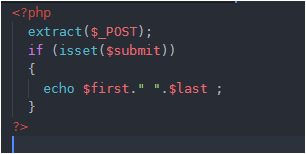
Please take note of this that whenever we place any submit button in form, it is compulsory to use <form> tag. So in above code inside <form> tag I have used action=” “ . In action I have given the name of my php file which contains logic to display full name. You may give name of your PHP file inside action. So the PHP code I wrote in my PHP file is-

In PHP code, I have first extracted the keys into variables. (Actually the keys are the name which we give inside <input> tag in HTML file. You may check this using var_dump($_POST)) .

So converting keys into variables allows us to handle them as normal variables in PHP. Using isset($submit) tells us whether SUBMIT button is pressed or not. (submit is the name of my SUBMIT button in my HTML code, if you have given some other name use that name) . If SUBMIT is pressed then the first and last name will be concatenated with a space in between. And we will simply echo this. ($first and $last are my name which I have given to first and last name respectively in my html code, yours might be different so use that)

Save both your PHP and HTML file in Documents Tool Folder (www) and run your HTML file (not PHP).

That’s it.

Have ERROR FREE coding!