Functions in Python

Functions provide code re-usability i.e. once a function is written can be invoked anytime upon need.

They have one disadvantage too. They take more time to implement because the control has to jump from normal code to the functions and then returns back to the calling environment. This is known as Context Switching.

Information or data is passed to functions through parameters, if needed. Functions can be with or without parameters.

Functions if needed, can return some value or values or even a function. Thus function can have or cannot have return type.

List Comprehension in Python

List Comprehension is an excellent way to define a new List in just a single line.

Syntax: [function for var in iterable ]

—–> Let’s print all numbers within a given range

—–> Let’s print all numbers within a given range after adding 5 to them

—–> Let’s print all even numbers within a given range

Notice that function/expression is inserted at first place , for loop at second place and condition numbers%2==0 is inserted in the last.


List comprehension can be nested too.

Let me explain how.

Suppose we have a list of lists as-

myList = [ [11,22,33], [44,55,66], [77,88,99] ]

And I wish to print it in a flat format like this- 11, 22, 33, 44, 55, 66, 77, 88, 99.

Normally, we use following logic for implementation-

But things become Super Duper Easy when we implement using List Comprehension.

Okay so in above code, the control first is at for Lst in myList then it goes to for nums in Lst

and then it finally prints the nums . This follows exactly in the same sequence as in the code which is implemented without list comprehension.

—-> Now let’s print all Prime numbers using List Comprehension

—-> Print all Armstrong numbers within a given range

Without list comprehension-
Using List Comprehension

That’s it !

Happy Coding!

Practicing Lists(2)- Booking Management System


#             BOOKING MANAGEMENT SYSTEM
# 1. View all Seats
     # seats are from 1 to 50 only

# 2. Booking 
     # On Booking, the seat changes from 1 to B
     # If seat is already booked, then display a message

# 3. Cancellation
    # Change seat number from B to original number

# 4. Exit


print("\n\n\n-----------------------------------------------------------------------------")
print("-------------------------   Welcome to Python Booking System ------------------")

Seats = []
allBookedSeats =[]
check = True
for seat in range(1,51):
    Seats.append(seat)

while check:
    print()
    print("-------------------------------------------------------------------------------")
    print('''\n     Press
           1. View All Seats
           2. Book Your Seat
           3. Cancel your Booking
           4. Exit from System
        ''')
    print("-------------------------------------------------------------------------------")
    choice = int(input("Enter Your choice: "))


    # 1. ------------------------------------ View ALL Seats
    if choice==1:
        
        for seat in Seats:
            print(" ",seat, end=' ')
        print()
            

    # 2. -------------------------------------- Booking Seats
    if choice==2:
        show = 0
        
        # Show All Booked Seats to User
        print()
    
        for book_seat in allBookedSeats:
            print("Seat No.: ",book_seat+1," is Booked" )
            show += 1
        if show==0:
            print("All seats are Empty")
        
        # Booking Seats
        print()
        print("To book Your seat, Enter an Empty Seat Number: ")
        seat_num = int(input())
        if Seats.count(seat_num):
            Seats[seat_num-1] = 'BOOKED'
            allBookedSeats.append(seat_num-1)
            print("Your Seat is Successfully Booked! ")
        else:
            print("Oops! Seat is already Booked")

    # 3. ------------------------------------------ Cancel Booking
    if choice==3:
        cancel_seat = int(input("Enter Seat Number to cancel Your Booking: "))
        if type(Seats[cancel_seat-1])==int:
            print("This seat is already vacant ")
        else:
            Seats[cancel_seat-1] = cancel_seat
            print("Seat is Successfully Cancelled! ")
    
    # 4. ------------------------------------------ Exit    
    if choice==4:
        check = False


Practicing Lists in Python – Employee Management System


#                             EMPLOYEE MANAGEMENT SYSTEM

# 1. View all the details of employees
# 2. Inserting a new Employee
# 3. Deleting details of an Employee
# 4. Updating
# 5. Searching 
# 6. Exit
print("\n----------------------------------------------------------------")
print('''Press: 
                1 - View All Details of Employee
                2 - Insert New Employee
                3 - Delete an Employee
                4 - Update Employee's info
                5 - Search Details of an Employee
                6 - Exit
                ''') 
print("----------------------------------------------------------------")
emp_exit= True
Employee = []


while(emp_exit):
 print("\n----------------------------------------------------------------")
 choice = int(input("Enter Your Choice: "))

 #--------------------------------- View all details of Employee
 if choice==1:
  if len(Employee)==0:
   print("No Employees' details exists in the System")
  else:
   for employees in Employee:
    print(employees)

 #-------------------------------- Inserting New Employee
 if choice==2:
  print("You need to give Details Of Employee ")
  emp_id = int(input("\tID: "))
  
  # Checking Duplicate ID
  dup_id = 'NO'
  if len(Employee)!= 0:
   inc = 0
   for allemps in Employee:
    if Employee[inc][0]==emp_id:
     print("Oops! Employee with this ID already exists...")
     dup_id='YES'
     break
    else:
     inc += 1
  if dup_id=='NO':
   emp_name = input("\tName: ")
   emp_dept_no = int(input("Department No.: "))
   emp_salary = int(input("Salary: "))
   employees = []
   employees.append(emp_id)
   employees.append(emp_name)
   employees.append(emp_dept_no)
   employees.append(emp_salary)
   Employee.append(employees)

 #--------------------------------- Deleting Employee
 if choice==3:
  if len(Employee)==0:
   print("System contains 0 records...")
  else:
   inc = 0
   print("Do you want to Delete an Employee from the system?")
   ans = input("Yes/No ").upper()
   if ans=="YES":
    del_id = int(input("Enter ID of Employee which you want to Delete "))
    for allemps in Employee:
     if Employee[inc][0]==del_id:
      del(Employee[inc])
      inc += 1
     else:
      print("This Employee doesn't exist in the System")
      break
   else:
    pass

  # --------------------- Update Details of Emps
 if choice==4:
   if len(Employee)==0:
    print("System contains 0 records...")
   else:
    print("Please give ID of the Employee whose info you want to Update... ")
    updat_id = int(input("ID: "))
    print('''Press
              'N' for updating Name
              'S' for updating Salary
              'D' for updating Dept ID
              ''')
    ans = input().upper()
    inc = 0
    id_match_found = False
    for allemps in Employee:
     if Employee[inc][0]==updat_id:
      id_match_found = True
      if ans=='N':
       allemps[1] = input("Enter New Name of Employee ")
      if ans=='S':
       allemps[3]= int(input("Enter New Salary "))
      if ans=='D':
       allemps[2]= int(input("Enter New Dept. ID "))
     else:
      inc += 1
    
    # if ID is wrongly entered, then a message is sent to the user
    if not id_match_found:
     print("Oops! No Employee with this ID exists...")
 
 # ---------------------------- Searching an Employee 
 if choice== 5:
  if len(Employee)==0:
   print("System contains 0 records...")
  else:
   inc = 0
   print("Enter ID to search an Employee ")
   search_id = int(input())
   for allemps in Employee:
    if Employee[inc][0]==search_id:
     print(allemps)
  
 #------------------------------- Exit option
 if choice==6:
  emp_exit = False


Control Flow in Python

Python Program to show the use of if-statement :

parentheses after if statement is optional…

Python program to show the working of if-else statement:


Python program to show the working of if…elif…else statement:


Program to show the working of While loop:


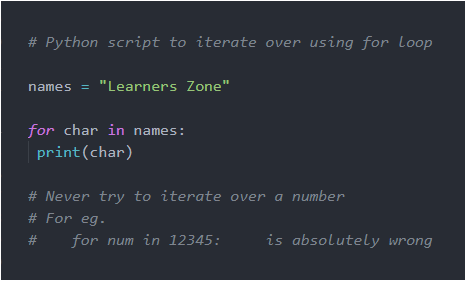
Program to show the working of For-in loop:


Python Script to show the working of Pass Statement

Pass is used when we are not known how this condition should be handled but it is known that this condition is sure to occur. Remember, we cannot leave the body empty of any condition or any function.

Pass means nothing, it just passes the control to very next statement, if present.


Python Script to Show the Working of Break Statement:

Break allows to terminate from the loop/iteration immediately without executing the following statements in the loop, if the condition isn’t satisfied.


Python Script to show the working of Continue Statement:

Continue allows to skip only the current event if condition isn’t satisfied and proceed with the iteration.


range() Function in Python

range(start, stop, step)

Above syntax is of range() function. It has 3 parameters:

  • start: it is optional. It is the starting value and by default it is 0.
  • stop: it is required. It specifies the end value.
  • step: it is optional. And specifies the number of positions to be incremented.
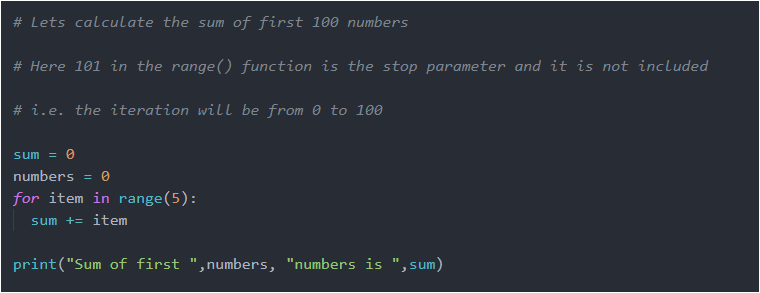
Python Script to show the working of range() function:
Python program to print all Prime numbers:
Python program to print AP Series from 50 to 500 as first and last number respectively with difference of 17 :

Run the above codes and analyse the output. If any doubt feel free to post your problem in comments below.

Happy Coding!