

Normally, a class member (instance variables or methods) is accessed only through an object of its class. However, it is possible to create a member that can be used by itself without reference to a specific instance.
To create such a member, we precede its declaration with static keyword.
Any static member can be accessed before any object of its class are created or even exist.In simple language you can understand that static members don’t care of instantiation (object creation) of its class. They are always available.
Both variables and methods can be static.
The most common example is main() method. It is declared as static because it is called before any object exists. static allows main() to be called without having to instantiate a particular object of class. This is necessary since main() is called by JVM before any objects are made.
When objects of such a class, in which instance variables are declared as static, are created, no copy of static variable is made. That static variable exists singly- the original. Let me show this with couple of codes (first code is the normal program without static and second code is with static) –
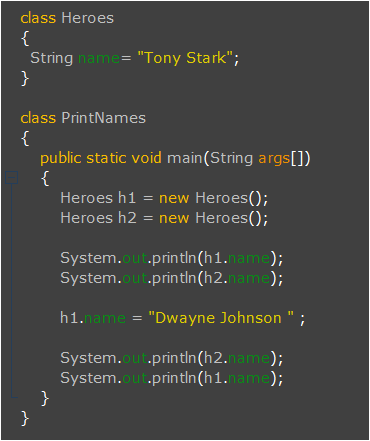
this is the normal program without static keyword
OUTPUT- Tony Stark
Tony Stark
Tony Stark
Dwayne Johnson
Above code and its output should be quite clear. I have created two objects (h1, h2) of class ‘Heroes’ and first printed the ‘name’ of both these objects. Look they give same output because I have initially initialized the ”name” with ‘Tony Stark’. Don’t get confused that only one ‘name’ is shared by both objects. This is not the case, both have separate memories for their particular ‘name’. Then I have changed the ‘name’ attribute of h1 and then again printed the ‘name’ of both the objects. In this case the name attribute of h2 remained same (‘Tony Stark’) while that of h1 changed to ‘Dwayne Johnson’. This clearly shows that both the objects do have separate memory allocation for ‘name’. This means two copies of ‘name’ are created – one for h1 and other for h2. Right !
Now look carefully the following code where I have made just a small change- ‘String name’ to ‘static String name’ in second line.
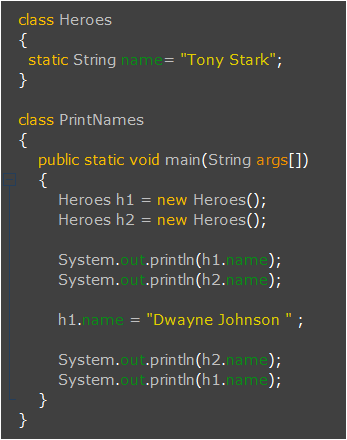
OUTPUT – Tony Stark
Tony Stark
Dwayne Johnson
Dwayne Johnson
In above code, both objects (h1 and h2) share same memory so if changes are made in h1, it is clearly reflected in h2. I hope you got it… Thus all instances of the class share the same static variable.
Methods declared as static have following restrictions:
- They can only directly call other static methods.
- They can only directly access static data.
- They cannot refer to
thisorsuper.
Let me give you an example –
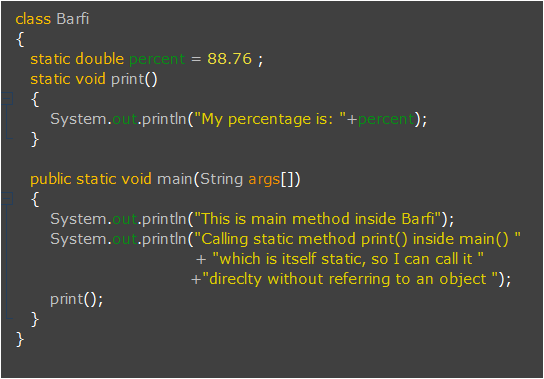
In above example, one instance variable – ‘percent’ is static and print() method is also static so they can be directly accessed in any static method. Since main() is static so look how it directly accesses other static members (percent and print()) of class.
We can use static block also. It is actually used to initialize static members of class. And important thing to note is it is executed before main(), so yes if you are thinking to run your program without main() it will run if you have static block. That’s why this concept is invalid in current versions of JDK.
It is not at all useful in current versions of Java. So let’s focus only on important things. 🙂
How to access static members outside the class ?
Not much tiring, especially when you are dealing with static members. Static members are accessed by the use of the dot operator on the name of class. In Program-2 I have accessed static members through objects but let me tell you this is not at all needed, this is wasteful. You can access them directly. I showed that to you just to make the difference clear between static variables and non-static variables.
Now look at this code, I even don’t need to create objects to access them, however we can create when needed.
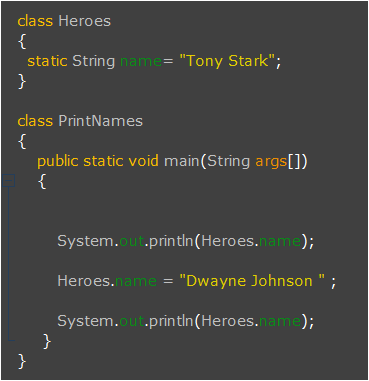
OUTPUT – Tony Stark
Dwayne Johnson
That’s it for static…
Have a good time !


 LearnersZone