
We have discussed many basic tags of HTML in our previous post.
Here, we will see 2 important topics-
MARQUEE tag
Marquee is such an amazing tag, you can play with it using some of its fascinating properties. You might have seen in some sites there is some image or a text which moves either from left to right or right to left or top to bottom or bottom to top. This movement is due to the use of <marquee>. Look below-
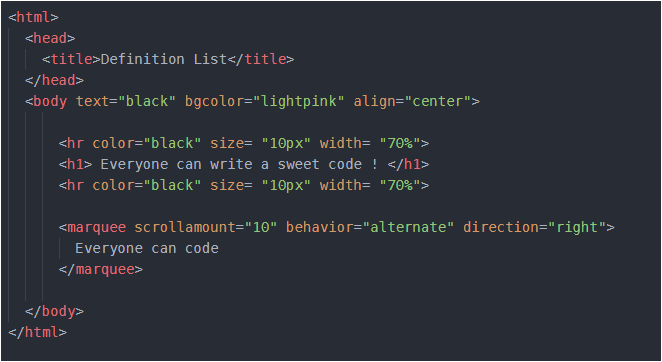
<marquee> tag has three basic properties – scrollamount (decides the speed of movement), behavior (this includes scroll, alternate or slide) and direction (it includes the direction of motion right, left, top, bottom). Try changing the result of these properties and analyze the result by yourself.
Instead of text, we can add any image or even a link to other page and it will also move in the page as per the properties which you will set. Let me now, quickly show you a code with image, as well as a link as a moving item-
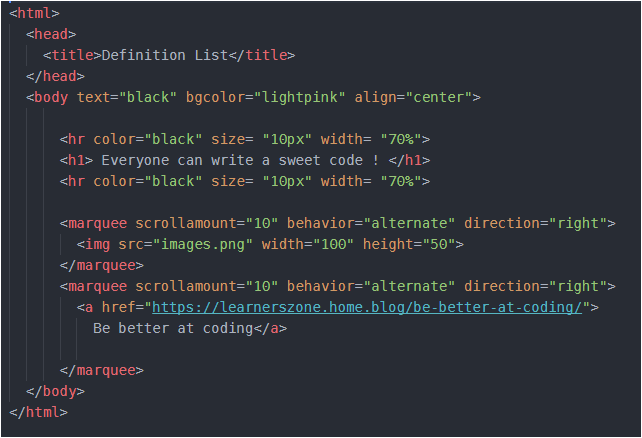
In above code I have inserted two <marquee> tags. First <marquee> tag makes a image move while second one is the movement of link. And I have given that link a name ‘Be better at coding’. So you will see this line- ‘Be better at coding’ move and if you click on this line you will jump to some other web page. Remember that to insert any link in a web page, we use <a></a> anchor tag. And inside anchor tag we give the address of page, in which we want to jump, to href. And so, I have done the same thing.
If you run the code as it is, you will see some wonderful result. But again remember that the image should be in the same folder in which your HTML file is located. I have saved my image with “images” and so I have used that name in my HTML file. You should write your image’s name.
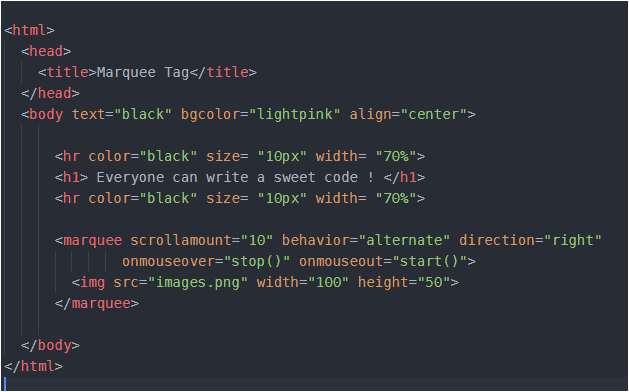
Now, while the link or image or text moves in the page, we have no control to stop that. But HTML provides some events using which, if you bring/hover your mouse pointer over that moving image/ text it will stop. And as soon as you remove your mouse pointer, the image/text will resume its movement. So, the two events are- onmouseover and onmouseout. We want that if we bring the mouse pointer over the image or even in its path of movement, it should stop moving and if we remove the mouse pointer over that image, it should start moving. These two actions – stop and start are performed using stop() and start() function. These will be implemented as follows-
I have tried to make this post simple. So, iof you have any confusion or doubt, share it in comments below so that it can be resolved.
Have ERROR-FREE coding…
 LearnersZone
One thought on “HTML continued… (2)”